
Mac125 – macOS Programming App for the Uniden UBC125XLT
If you’ve landed here, chances are you own a Uniden UBC125XLT and also prefer using a Mac. That was exactly my situation too.
After years of looking for a native macOS option and not finding one that did what I needed, I decided to build one myself. The result is Mac125: a macOS app designed to read, edit and write channel data to the Uniden UBC125XLT over USB.
It started as a personal challenge, but with growing feedback from other users, it has become a proper ongoing project.
What Mac125 does
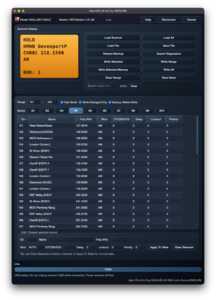
- Reads channels from the scanner into a table view
- Lets you edit channel details in-app
- Writes selected, ranged, or full channel sets back to the scanner
- Includes a real-time emulated display showing scanner status
- Supports both Apple Silicon and Intel builds (from current releases)
Download
You can download the latest release here:
Mac125 GitHub Releases
First-launch note (important)
Because Mac125 is currently distributed directly via GitHub Releases (and not the Apple App Store), macOS Gatekeeper may show a warning the first time you open it.
If that happens, please don’t panic, the app is not “dead”.
Use one of the documented open/allow methods in the release notes and user guide.
Support and feedback
The easiest way to get support, ask questions, or report issues is via Discord:
Mac125 Discord Support
You can also use the Help button inside the app for support links and contact options.
A quick word…
Mac125 is released with full functionality at no charge.
If you find it useful, please consider supporting future development with a donation.
Thanks to everyone who has tested early builds, reported bugs, and helped shape where the app goes next.
73,
John – GW3JVB